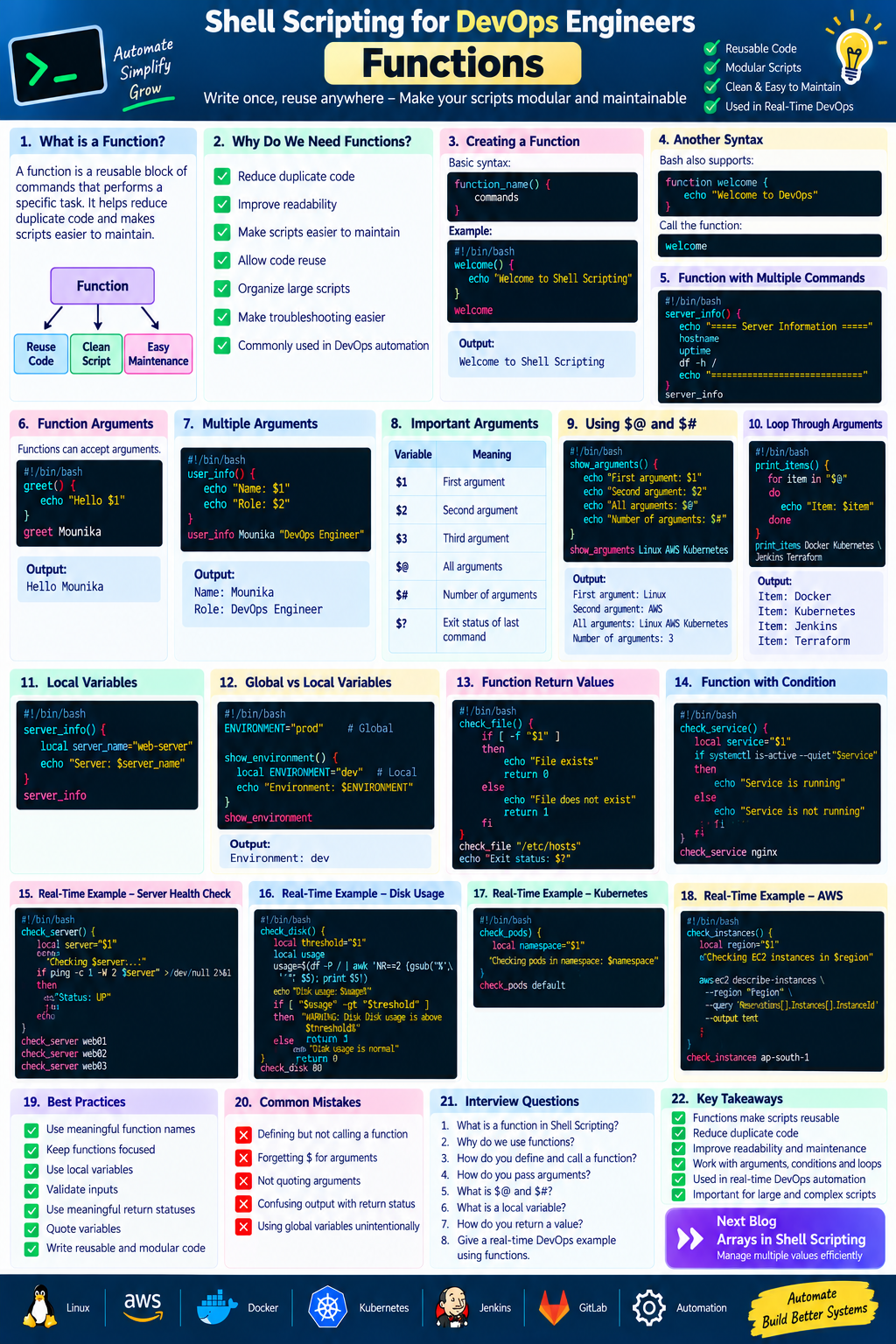
Shell Scripting for DevOps Engineers — Functions
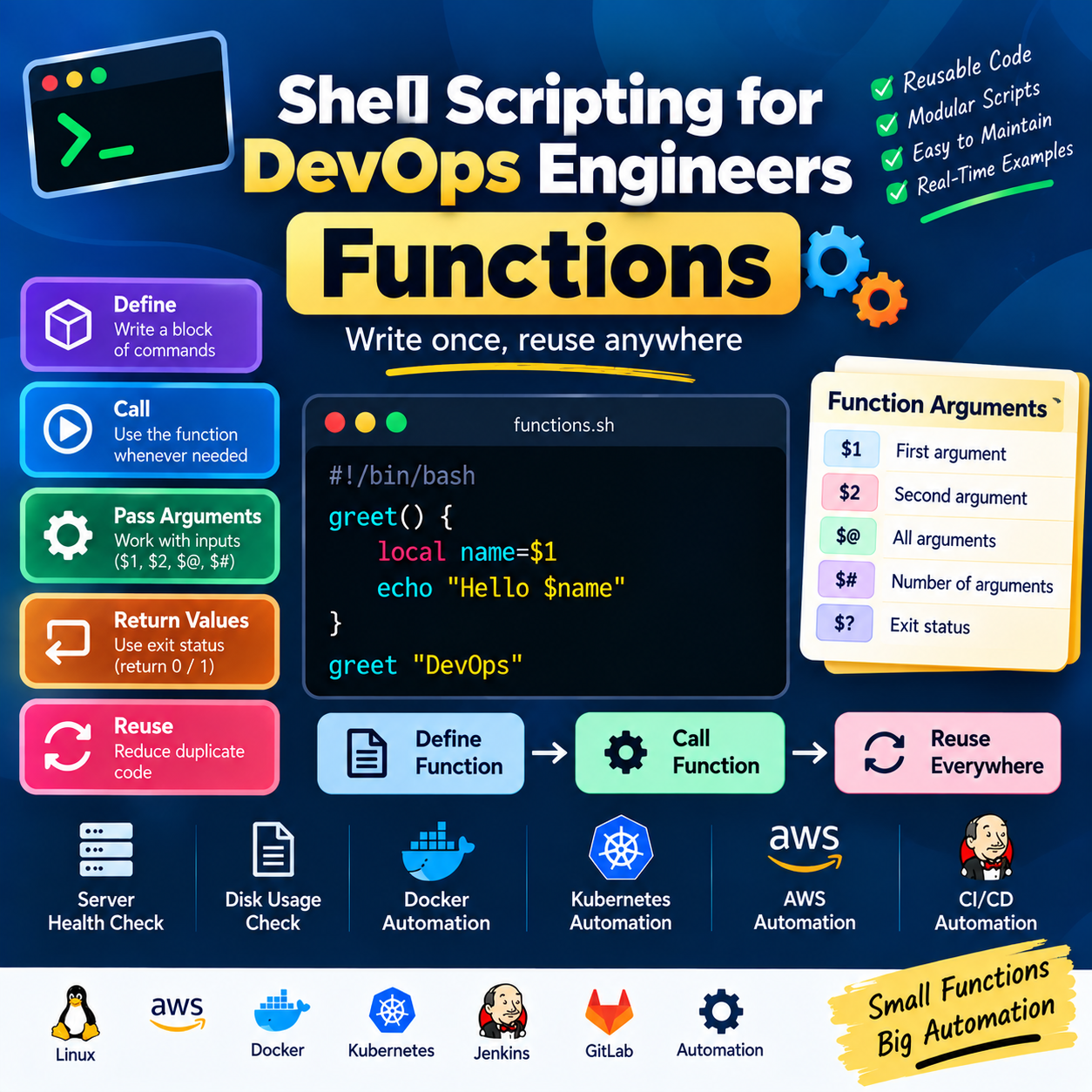
Write once, reuse anywhere — Functions make Shell scripts cleaner, modular, and easier to maintain.
In the previous article, we learned about Loops in Shell Scripting.
Loops help us automate repetitive tasks. But when a script becomes large, writing everything in one place can make it difficult to understand and maintain.
1. What is a Function?
A function is a reusable block of commands that performs a specific task.
Instead of writing the same commands multiple times, we can create a function once and call it whenever required.
Example:
#!/bin/bash

greet() {
    echo "Hello DevOps"
}

greet
Output:
Hello DevOps
Here:
greet()
   ↓
Function definition

greet
   ↓
Function call
2. Why Do We Need Functions?
Imagine we have to check server status in several places in our script.
Without functions:
echo "Checking server..."
ping -c 1 server1

echo "Checking server..."
ping -c 1 server2

echo "Checking server..."
ping -c 1 server3
This creates duplicate code.
With a function:
check_server() {
    echo "Checking server..."
    ping -c 1 "$1"
}

check_server server1
check_server server2
check_server server3
Now the same logic can be reused.
Benefits of Functions
Reduce duplicate code
Improve readability
Make scripts easier to maintain
Make troubleshooting easier
Allow code reuse
Help organize large scripts
Make automation more modular
3. Creating a Function
The basic syntax is:
function_name() {
    commands
}
Example:
#!/bin/bash

welcome() {
    echo "Welcome to Shell Scripting"
}

welcome
Output:
Welcome to Shell Scripting
4. Another Function Syntax
Bash also supports:
function welcome {
    echo "Welcome to DevOps"
}
Both forms work in Bash.
A commonly used style is:
welcome() {
    echo "Welcome to DevOps"
}
5. Calling a Function
Defining a function does not execute it.
We need to call it.
Example:
#!/bin/bash

hello() {
    echo "Hello DevOps"
}

hello
The function is executed when we write:
hello
6. Function with Multiple Commands
A function can contain multiple commands.
#!/bin/bash

server_info() {
    echo "===== Server Information ====="
    hostname
    uptime
    df -h /
    echo "=============================="
}

server_info
Output will contain information such as:
===== Server Information =====
Hostname
System uptime
Disk usage
==============================
This is useful for creating reusable server-management functions.
7. Function Arguments
Functions can accept arguments.
Example:
#!/bin/bash

greet() {
    echo "Hello $1"
}

greet Mounika
Output:
Hello Mounika
Here:
$1
 ↓
First argument
8. Multiple Function Arguments
We can pass multiple arguments.
#!/bin/bash

user_info() {
    echo "Name: $1"
    echo "Role: $2"
}

user_info Mounika "DevOps Engineer"
Output:
Name: Mounika
Role: DevOps Engineer
Here:
$1 → Mounika
$2 → DevOps Engineer
9. Important Function Arguments
Some special variables are very useful.
| Variable | Meaning |
|---|---|
$1 |
First argument |
$2 |
Second argument |
$3 |
Third argument |
$@ |
All arguments |
$# |
Number of arguments |
$? |
Exit status of the last command |
Example:
#!/bin/bash

show_arguments() {
    echo "First argument: $1"
    echo "Second argument: $2"
    echo "All arguments: $@"
    echo "Number of arguments: $#"
}

show_arguments Linux AWS Kubernetes
Output:
First argument: Linux
Second argument: AWS
All arguments: Linux AWS Kubernetes
Number of arguments: 3
10. Using $@
$@ represents all positional arguments.
Example:
#!/bin/bash

print_items() {
    for item in "$@"
    do
        echo "Item: $item"
    done
}

print_items Docker Kubernetes Jenkins Terraform
Output:
Item: Docker
Item: Kubernetes
Item: Jenkins
Item: Terraform
This is very useful when a function needs to process an unknown number of arguments.
11. Using $#
$# tells us how many arguments were passed.
Example:
#!/bin/bash

count_items() {
    echo "Number of items: $#"
}

count_items AWS Docker Kubernetes Terraform
Output:
Number of items: 4
12. Local Variables
Variables inside functions can be declared using local.
Example:
#!/bin/bash

server_info() {
    local server_name="web-server"
    echo "Server: $server_name"
}

server_info
Using local helps prevent accidental changes to variables outside the function.
For reusable functions, using local variables where appropriate is a good practice.
13. Global vs Local Variables
Global variable
#!/bin/bash

ENVIRONMENT="prod"

show_environment() {
    echo "$ENVIRONMENT"
}

show_environment
The function can access the global variable.
Local variable
#!/bin/bash

show_environment() {
    local ENVIRONMENT="dev"
    echo "$ENVIRONMENT"
}

show_environment
Here, ENVIRONMENT is local to the function.
14. Function Return Values
A function can return an exit status.
Example:
#!/bin/bash

check_file() {
    if [ -f "$1" ]
    then
        echo "File exists"
        return 0
    else
        echo "File does not exist"
        return 1
    fi
}

check_file "/etc/hosts"

echo "Function exit status: $?"
A successful operation commonly returns:
0
A non-zero status generally indicates an error or unsuccessful condition.
15. Understanding $?
$? contains the exit status of the most recently executed command.
Example:
#!/bin/bash

ls /tmp

echo "Exit status: $?"
If the command succeeds:
Exit status: 0
If it fails, a non-zero value is returned.
This is extremely useful in automation scripts.
16. Function + Condition
We can combine functions with conditional statements.
#!/bin/bash

check_service() {
    local service="$1"

    if systemctl is-active --quiet "$service"
    then
        echo "$service is running"
        return 0
    else
        echo "$service is not running"
        return 1
    fi
}

check_service nginx
This creates a reusable service-checking function.
17. Function + Loop
Functions and loops can work together.
#!/bin/bash

check_server() {
    local server="$1"

    if ping -c 1 -W 2 "$server" >/dev/null 2>&1
    then
        echo "$server is UP"
    else
        echo "$server is DOWN"
    fi
}

for server in web01 web02 web03
do
    check_server "$server"
done
Here:
for loop
   ↓
Server list
   ↓
Function
   ↓
Health check
This is a practical automation pattern.
18. Real-Time DevOps Example — Server Health Check
Let's create a reusable server-health function.
#!/bin/bash

check_server() {
    local server="$1"

    echo "Checking $server..."

    if ping -c 1 -W 2 "$server" >/dev/null 2>&1
    then
        echo "Status: UP"
    else
        echo "Status: DOWN"
    fi

    echo
}

check_server web01
check_server web02
check_server web03
Instead of writing the health-check logic three times, we created it once and reused it.
19. Real-Time DevOps Example — Disk Usage
We can create a reusable disk-check function.
#!/bin/bash

check_disk() {
    local threshold="$1"

    local usage
    usage=$(df -P / | awk 'NR==2 {gsub("%","",$5); print $5}')

    echo "Disk usage: $usage%"

    if [ "$usage" -gt "$threshold" ]
    then
        echo "WARNING: Disk usage is above $threshold%"
        return 1
    else
        echo "Disk usage is normal"
        return 0
    fi
}

check_disk 80
Example:
Disk usage: 65%
Disk usage is normal
This function can be reused with different thresholds:
check_disk 70
or:
check_disk 90
20. Real-Time DevOps Example — Kubernetes
Functions can make Kubernetes scripts much cleaner.
#!/bin/bash

check_pods() {
    local namespace="$1"

    echo "Checking pods in namespace: $namespace"

    kubectl get pods -n "$namespace"
}

check_pods default
We can reuse the same function:
check_pods dev
check_pods qa
check_pods prod
This avoids repeating the same Kubernetes command.
21. Real-Time DevOps Example — Docker
We can create a function to check Docker containers.
#!/bin/bash

check_containers() {
    echo "Running Docker containers:"
    docker ps
}

check_containers
We can extend the function later with additional checks.
22. Real-Time DevOps Example — AWS
We can create a function for checking EC2 instances.
#!/bin/bash

check_instances() {
    local region="$1"

    echo "Checking EC2 instances in $region"

    aws ec2 describe-instances \
        --region "$region" \
        --query 'Reservations[].Instances[].InstanceId' \
        --output text
}

check_instances ap-south-1
check_instances us-east-1
The same function can work with different AWS regions.
23. Function for Deployment
We can create a reusable deployment function.
#!/bin/bash

deploy_application() {
    local environment="$1"
    local application="$2"

    echo "Starting deployment..."
    echo "Application: $application"
    echo "Environment: $environment"

    echo "Deployment completed."
}

deploy_application dev payment
Output:
Starting deployment...
Application: payment
Environment: dev
Deployment completed.
This structure can later be expanded with actual deployment commands.
24. Function with Validation
A good DevOps script should validate its inputs.
#!/bin/bash

deploy_application() {
    local environment="$1"
    local application="$2"

    if [ -z "$environment" ] || [ -z "$application" ]
    then
        echo "Usage: deploy_application <environment> <application>"
        return 1
    fi

    echo "Deploying $application to $environment"
}

deploy_application prod payment
This prevents the function from running with missing information.
25. Complete DevOps Script Using Functions
Let's combine several concepts:
#!/bin/bash

show_header() {
    echo "=============================="
    echo "   SERVER HEALTH CHECK"
    echo "=============================="
}

check_hostname() {
    echo "Hostname: $(hostname)"
}

check_uptime() {
    echo "Uptime: $(uptime -p)"
}

check_disk() {
    local usage

    usage=$(df -P / | awk 'NR==2 {gsub("%","",$5); print $5}')

    echo "Disk Usage: $usage%"

    if [ "$usage" -gt 80 ]
    then
        echo "WARNING: High disk usage"
    else
        echo "Disk usage is normal"
    fi
}

show_header
check_hostname
check_uptime
check_disk
This script is easier to understand because each function performs one specific task.
26. Why Functions Are Important in DevOps
Functions are especially useful when building automation scripts for:
Linux
Server checks
Log analysis
File management
Service management
AWS
EC2 operations
S3 operations
Backup automation
Resource checks
Docker
Container checks
Image management
Cleanup scripts
Kubernetes
Pod checks
Deployment validation
Namespace operations
Cluster health checks
CI/CD
Build functions
Test functions
Deployment functions
Rollback functions
27. Best Practices for Functions
1. Give functions meaningful names
Prefer:
check_disk()
instead of:
function1()
2. Keep functions focused
A function should ideally perform one logical task.
3. Use local variables
Example:
local server="$1"
4. Validate inputs
if [ -z "$1" ]
then
    echo "Argument required"
    return 1
fi
5. Use meaningful return statuses
return 0
for success and a non-zero status for failure.
6. Quote variables
Prefer:
"$server"
instead of:
$server
28. Common Mistakes
Mistake 1: Defining but not calling a function
hello() {
    echo "Hello"
}
The function won't run until we call:
hello
Mistake 2: Forgetting $ for arguments
❌ Incorrect:
echo "Server: 1"
✅ Correct:
echo "Server: $1"
Mistake 3: Not quoting arguments
Prefer:
echo "$1"
instead of:
echo $1
Mistake 4: Confusing output with return status
This:
echo "Success"
prints text.
This:
return 0
sets the function's exit status.
They serve different purposes.
29. Practical Exercise
Create a script called:
server-health.sh
Create the following functions:
show_header()
check_hostname()
check_uptime()
check_disk()
check_memory()
Then call all the functions at the bottom of the script.
Expected structure:
#!/bin/bash

show_header() {
    echo "===== SERVER HEALTH ====="
}

check_hostname() {
    hostname
}

check_uptime() {
    uptime -p
}

check_disk() {
    df -h /
}

check_memory() {
    free -h
}

show_header
check_hostname
check_uptime
check_disk
check_memory
Try to improve this script by adding conditions for disk and memory usage.
Key Takeaways
In this article, we learned:
What functions are
How to create functions
How to call functions
Function arguments
$1,$2,$@,$#Local variables
Return status
$?Functions with conditions
Functions with loops
Linux automation
AWS automation
Docker automation
Kubernetes automation
CI/CD automation
Function best practices
Functions help us turn large Shell scripts into small, reusable, and maintainable automation components.